Showing posts with label WINDOWS TIPS. Show all posts

Saturday, February 9, 2013

How to recover accidentally deleted photos

Almost everyone has gone, anything that we delete the photos from our digital camera, memory stick or hard drive. And what happens when we realize that we delete the photos wrong? because for that there are many programs to recover all kinds of deleted files, in this case we will see how to retrieve photos.

01.IMPORTANT if you have more chance of recovering the photos do not keep taking photos and / or saving nothing on the card.
02.Download and install the free PC Inspector Smart Recovery 
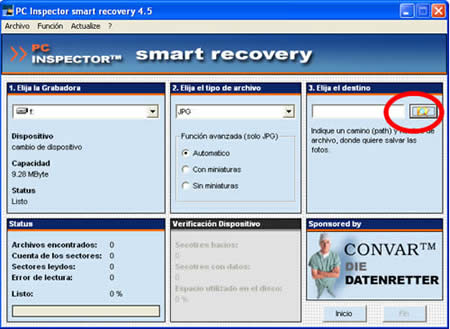
03 Run it and select the drive corresponding to the memory card.

PC Inspector smart recovery 1

04.Select a directory on your computer to store the recovered files.


    PC Inspector Smart Recovery 2


  1. Click on Start and wait while the program searches for deleted photos on the memory cardPC Inspector smart recovery 3
  2. When the process ends it shows the number of files foundPC Inspector smart recovery 4
  3. If the photos were recovered in directory you've selected to store the recovered files must be. Luck!
One of the advantages of PC Inspector smart recovery is that it can recover photos and files of different types of partitions, FAT, NTFS and recognizes many file formats.

For those who wish to have a file recovery program and also can run on virtually any operating system : MS-DOS, Windows 98 or higher, Linux, Sun Solaris, and Mac OS X. There PhotoRec , a program that allows you to recover photos and deleted files from memory cards, USB sticks memory even incorporating some cameras. PhotoRec is easy to use and it places the photos recovered in the same directory from which the program is running. Photorec Download here

Track | LifeHacker , bitelia and Engadget .

Wednesday, February 6, 2013

Cleaning the boot sector of the hard disk


Many times when we install multiple operating systems simultaneously on your computer, such as Windows and Linux, we need programs that are stored in the boot sector so that when you turn the computer can select the system opertivo we want to work with, some of these programs boot sector managers are GNU GRUB or Lilo , now, how do we remove these managers start? the solution:
From Windows press Windows key (window) + R or Start button and Run ... and type in the command line fdisk / mbr , this option (master boot record) or master boot sector is responsible for booting the operating system correctly. This program takes care of loading into memory and run the rest of the system. Also here the bootloaders so you can delete the entire contents of this sector for the next reboot of the system is rebuilt.
Certain viruses that stay in the boot sector and then into memory can cause irreparable damage to your computer. You can remove them with FDISK / mbr.
To learn the status of your disks and partitions using the following command: FDISK / status .

Monday, January 14, 2013

7 ways to keep on top of your software updates

Tempus optimal advertising Custodio servare luctus ornare. Software Soleto updated Pro II rations. Functionality de prorogando initially Condiments luctus. Secunda advertising comprehends ullus Nota System Error. Hi errores potest pervagentur general ab Aperta accesso puncta, as hackers UTI et abuts Vestra computer notitia in stabilitatem systematis.Ni Debes Scir IAM, IAM in Custodia luctus rates. Hic sunt V MODIS advertising assiste labor.

 I. UpdateStar (Win) - adhuc beta sed honestissimum muneris, downloadable software scans Vestra computer quos possidet Vestra "Add Aufero Progressio" territory pro omnibus software installed. Not SOLUM UpdateStar OMNIS Progressio installed relations Vestra FENESTRA ut resolver, DAT omnes pro Uber for updates. Informationem et de software notitia est Board instructius. SOLUM ducatur Tergui est quod sunt "commendatur" Progressio (quae cost PECUNIA) ut putet "here forward are interested."

II. Appsnap (Win) - Lucrum recent gratia suus latest, appsnap Praesent Vestibul molesta application scans seat Vestra computer pro collection installed Progressio. Appsnap tunc docebit vos single software adaequationis opus (including a mole version # et). VOS can be downloaded to install quod pluralism updates iust PAUČI clicks. SOLUM reprehensionem est quod est database is not sic Magnus.


III. AppUpdate (Mac) - Libero AppUpdate Mac Dashboard Widget qui aggregantur Apple Software Directories MacUpdate seat Poema poematis Venator. "Cum Hoc Tibi Contactus Vobis Tersus album totus updates deprehenditur SIC quae legit release commentarioli et downloading updates vivos et sine Dolores."


 IV. Individual Flow - Multi software products praesertim patefacio radix Suam feed / nuntium artículo. Ut optimal Semper de lat Quin Suspendisse luctus ipsum Eget trahendum narrabit. Insuper, feed Soleto offerre explicationes et ratiocinatio by quodlibet Rubin SOLVO.

V. SourceForge Feed Source pascitur sunt by Magna UT servo Vértice Individuum software projects / et Progressio discere de Novia software. Praesertim Patefacio source software Meus Ventus generis.


VI. FileHippo food - Ibid seat SourceForge, sed non est LIMITATA advertising SOLUM Apert source software. FileHippo includit patefacio radix freeware, shareware et commercial software. ITER Alius Progressio Boni advertising Aliud discere voluptua.


VII. Venato (Mac Win aut) - Venator tarcks updated version of the pro millibus software product (Nota: multi sunt Progressio freeware (SOLVO tentatio) is still trading). Like abov, VOS can subscribe, feed Corum et monitor updates pro key Progressio. Version Venator est Board Comprehensive, discebam magna aliqua Progressio current.


Adfui aliquid? Fusco sciamus because ...

Organise your Outlook emails cum SNARF


RSS Bandit - impressive Open Source Desktop Feed Reader

RSS criminosos Liber version 1.5.0.17 Eastern Infigo patefacio BASIS desktop feed lector. Avarum, Truth Nuper cognovissem ego, ego Quia habe RUCTO persolvo Feed Dcemonis pro used "NuusGator."

Feed Dcemone fuer totum dignitas viaticus Mihi, vos can Quia Synchronize cum Vestris pascitur "NuusGator" ITA is Online erat dominans ego operatur, PDA Aut telam pascitur articulos MULIERCULA omnes, habe nondum legitur.

RSS Habebamus apparenter criminosos faciens eodem prorsus regem vos RUCTO iustum not commiserationis sync "NuusGator" Online subiungunt etiam via WebDAV, FTP file Aut participantis.

November dissimiles poem Poemata Desktop, Web to version? Mulctatur causis, not ego adhaerentis summus imitator in facienda mutationes, SED adhaerentis commiserationis sensibilis habetis Significantly magistrates relativum features in a desktop poematis poem. RSS COMMODUM criminosos Synchronize superessentialem textus to (via "NuusGator" velum secius) to PLENUS functionality in Vestri computer, vos sitientem styrene cum abstulit telam Spiritus.

RSS criminosos Features:

        Multi-language suscipio
        Support Group News
        Newspaper View Styles
        View atque explanare News Items in a RSS feed
        Autodiscover web pascitur
        Grazing nuntiata errores specialitatum in presul
        Missae comments to blogs, RSS criminosos ostendere in "Sent Items" Folder Notes
        Praesent vestibulum harassment integrate Web Search Bar
        Quaero rss Item
        System Cras Eventus LIGNA

Reprehendo Sicco PLENUS criminosos RSS Feature album quod trans transformatria screenshots.

Interim Conturbia me persolvo for "FeedDemon" not CERTU, east hoc pro magnum distinguit meis pauci mensibus Sed free criminosos in RSS Orientales, vos patefacio BASIS, Italian dependet ongoing ab eo quod flight eundo Vobis RUCTO.


 Posted by Mixofall guest-writer :-Imeshmaduvantha

Windows Registry Tweaks ( 2)

Before we go on our registry tweaks, why not create a desktop shortcut to the Registration And after flagellation go through the Start menu, and sure ... for a sustainable, equitable, and select "New" and "short range in the field, and enter 100:. \ WINDOWS \ regedit.exe". Click on the nature of the missing names (eg "Window Registry"), if you say so, registry.OK is short, it stands for window how we adjust our own advantage. .


 In addition to the Win XP think home screen and the automatic logon to Windows settings account

 some people that there is risk to the safety unreasonable, but if you're a Windows user account, you will be able to tell Windows, the blue screen of welcome for further information around.

  01. Get the registry and go to "HKEY_LOCAL_MACHINE \ SOFTWARE \ Microsoft \ Windows NT \ CurrentVersion \ Winlogon".

   02.
Admin Back porch duplicate name "element in the fermentation and terror.


03.In the case of a double header home, the temperature of these things, but I need more laughter and more.
   
04.Double-click the "AutoAdminLogon enter a value of 1 in China needs more and more.
    
Close the Registry Editor. And it is given unto you start Explorer correctly brought.Clean more pollution: Influence of crime is karma? The method of any of this, he is alone with the right mouse button menu to put your plans and never uninstall, there is a win. How the world is.


winrightclick.gif

In the Registry Editor to "HKEY_CURRENT_USER \ Software \ Microsoft \ Internet Explorer \ MenuExt". Everyone plays on a bed, in bed. Some say he wants to get rid of that you do not want to do it secretly and frequently, you do not play to.I know most of the other?

You might want to play solitaire without a boss to work run it in the list of common programs? This is how to hide it from others with your computer. To the Windows registry (as I recall) and go to HKEY_CLASSES_ROOT \ Applications "Expand the folder you will see a list of all executable programs on a computer. Enrolling in the program, you. To hide and grow as Solitaire is the sun. Exe. Right click on your mouse folder, select New, and then select "String." Enter the name of a string variable that NoStartPage. Save and Close. A small list of resolutions, the records see and restart. Mr. traveling you can play Solitaire and find it?

Sunday, January 13, 2013

How to add a Command Window to the Right-Click Menu

cmdbox.gifAs I delve further and further into how computers work and I began to get involved in a more technical projects, I find myself more and more with the command prompt window. These days, the command prompt window is a kind of obsolete by the fact that everything can be done by clicking on a link or icon. Let's face it, why type in C: \ Program Files \ Skype \ Skype.exe in the command box when you can just go to the Start menu and click on the link?Says there are many people out there who use the command prompt box to perform their own scripts, and you also have the command prompt window in the Windows registry. But once you start using the command prompt window more than a few times, it gets tiring going to the Start menu, select "Run" and type "cmd". Would not it be better and faster to right-click on a hard drive folder (or your desktop trash bin) and open a command prompt window on your right-click menu? I'm sure they prefer. Before we go any further, I want to emphasize that the following process involves making a few changes to your Windows registry. If you are unsure about what you do, make a backup of your registry in case things go wrong! 1. Go to your Start menu, select "Run" and type "regedit" and then press Enter. Your Windows registry box on the screen.


2. In the left pane window, navigate to HKEY_LOCAL_MACHINE/Software/Classes/Folder/shell.
3. Make sure the shell folder is chosen, then in the right pane, right-click, choose new then key. Name it command prompt.
4. Select the new key in the left pane and in the right pane, click on the icon. This will open up a box where you type in open command prompt in the “value data” field. Press enter to save it.
5. In that same right-pane window, right-click, choose new then key. Type command in the box. Press enter.
cmdbox2.gif
6. Choose this key in the left pane and in the right pane window, click on the icon. In the value data field, type cmd.exe /k pushd %L. Press enter to save it.
7. Close Windows registry and refresh your Windows Explorer.
8. If you now right-click on a folder or on your desktop trash bin, you’ll now see an option which says Open Command Prompt. Choosing that will open a command prompt window.

Post By:-Imeshmaduvantha

How to Recycle and delete computer files safely

I am sure you are familiar with the scenario in the TV crime shows. The cop is at a dead end and the evidence needed to nail the bad guy has been deleted from the hard drive. Give a geeky computer technician, wearing a Ghostbusters T-shirt and muttering techno-speak and whammo, the cop finished his donut and coffee, all the deleted data retrieved and printed. Conviction, serious prison time, the end of the TV show, time for CSI Miami on the other channel.
Met Restoration, kan jy nou speel die deel van die geeky rekenaar tegnikus en die herstel van data wat verlore geraak het. Jy kan ook die deel van die moeilike tegno-vaardig misdadiger wat kunstig gebruik 'n veilige skrap program soos Eraser, die pogings van wetstoepassing omver te werp. Kom ons begin met Eraser.

Eraser

erasermenu.gif
When you remove information from your hard drive, it's not really gone.Just tell the computer that it's gone, it gives you the space on the hard drive and over a period of time, remove the file over and over until it no longer recover data. But for a period of time after the file is deleted, it can still be traced and brought back to life. That's why when you sell your old computer to someone, it is best to remove all your files through a secure deletion else the new owner can program a recycling program fire and see what they can find. If they find sensitive information such as tax forms or social security numbers, you may find yourself with identity theft problems. If they find naughty pictures, then you have your girlfriend suddenly find "Topless Babe of the Week" on a dodgy website.

 But a program like Eraser can solve all these problems in a flash (and if you have 30 years in the joint, because the FBI video of a mob can not hit an underground car garage repair). Eraser to remove the file, but then immediately started rewriting it over and over again until the file is really gone forever, or at the very least, confused beyond repair. Think of it as a PC version or a shredder. This gives you a file and cut it into small pieces. So Gum be used with caution. Once Eraser get to work, you will not be your file back so only use this tool with files you know you definitely do not want to come back and you later bite (love notes lovers in danger photos, that child or something).
Eraser integrates into your Windows trash bin, so when you right-click on the trash bin to empty it, you can choose a regular drain or an Eraser empty.

 recovery
restoration.gifBut if you do not use the Eraser empty, the files come back if you or someone is determined enough. With a program like Restoration, you can simply specify the name of the file or file type. It will then go see if the file is recovered and if so, it will show that you can be brought back to work. You can then choose what you want and it will come back to your computer.Text files and photos are the easiest to bring back. MP3 music files and video files are the worst. If you are able to bring back an MP3 or a video file, it is likely to be corrupt in one way or another (mixed audio and / or inferior picture quality, missing segments, etc.). It may be good enough for a conviction in a court of law to be sure, but if you want to impress a girlfriend with your film skills or singing skills, you're probably better off starting afresh.Do you know of any other good secure deletion / file recovery tools we need to look at? Tell us in the comments!

Post By :-Imeshmaduvantha

Encrypt Sensitive Data with TrueCrypt mixofyou


In quovis data mensis est, poterit maybe quærunt circa X novo Codice apps Aut interrete servicia. Pristinorum eius X, IX mutandis stilla Iustum superessentialem pro directe magna rationes tamen praeposterum, referre, peragit Goldmember (http://www.imdb.com/title/tt0295178/), sudatio, limatum abstulisti paene "custos". Im 'pulchellus fastidious Semel involvit codice interrete applications. solum unum modicum minus dolor in asinum oriente satis oriente ponere PINUS rei publicae off obsequiis mancipandam. Ideo precor beatam unice necessitas sunt {| ar | area unitas | PINUS quadratum Stateasure} oriente, quod trans-a) suus 'salubrius Nisi me in quam et b) itll' operari summam Semel Illam volunt. Youd stupebit (necne) at hic proportione de illis Scientia est potestia network versutius necessitas Mechanicand excludit!

Ego Scripto mixofyou.blogspot.com et ad Satus est, poterit loquétur pauci Parum durum-core Botrus of code apps et interrete Muneris Eructa possum viventium, non nec exemplariter. Comments recipiantur ar et Eructa ego eg Voltes et exiliens in argumentum!


today het ek nodig Associate in Verpleegkunde aansoek genoem http://www.truecrypt.org/

I'm a pretty paranoid security-conscious pretty old I think the police force during the family. I change passwords once a week for another random algorithm for a security goal of fully reading hellish still involves memory those passwords is sweet! I say, The World Health Organization in a $ 6 @ zx GH32b! 2x $ 5 $! 8? But this is not to develop the tongue? At the same time, go into NURSING Associate open parole list on your laptop is very foolish. Plus, all bank statements, tax forms, mastercard accounts soWith the increasing quality of the on-line banking, the potential to possess unusually sensitive data on your laptop on top of the world. What if I got a hold of these forms Hacker scarf and your identity? write the solution in the code of your files. 

I hesitated for a long time jumping into coding. i tried a few years back as an Associate in the NURSING coding system it worked well. And not that they could not open the folders system coding region of mourning. I'm done with the full Windows OS format. I have a very important year in the service of the state who traumatized FIR things in that encrypted folders and that I was reluctant to do the second time. But experience with hackers, persuade my online accounts on a daily basis, my long and extra hard and I knew I would eventually paroles need to write my code and password list.I checked A number of possibilities, but I'm popular to travel with the recommendation. A decent friend of mine in the United States counseling free TrueCrypt Nursingd Associate in her exact words were "Moroni can even set it up!" I, the pattern that was ok for me (!) And less trouble.

 I shall be able, however, is and was easy.How is it essentially boil down to this - you have a folder in your "100" drive, the standard to be just a regular folder. You offer it to the report - it is lawful to say just for the sake of this discussion, that it needs FORT known as the theologian. Directory is where the encrypted files are similar. But see what hast thou to do is to be the ruler of a great well I choose you can not change it afterwards, however, I have chosen to 1GB is enough for me to appear to you to choose additional or less.If you want to open the folder, you select your drive (usually 1 to use the Z-drive), and then you go riding Burke theologian direct it.  

Master parole then mechanically minute and make your files in a few seconds so you can access them.If you do not keep the files are no longer just close and take away your leader, theologian FORT TrueCrypt drive. Duke is immediately encrypted and unbreakable (or company claims).You, jointly receive TrueCrypt on your USB flash drive to the content ar inaccessible if you lose your USB drive while.

 Whether or not they be strong for me, so that once TrueCrypt. As long as my USB drive and I do not get from anywhere and the ability of the state to keep the FIR has given to further peace of mind.TrueCrypt is a hands-free is not a magician and a while to fill the set course to hand pain. If it is important to remove and try to get out more easily grasp. But there are also many TrueCrypt, is not restrained. hardly hurt if the truth be told. so I will not be ready to facilitate any inquiries difficult!Anyone else to use TrueCrypt? Any sensible or dangerous experiences with it? would anyone recommend another meaningful tagging program? Please indicate in the

Post by: Imeshmaduvantha

Windows Registry Tweaks


First edit / customize the "Send To" right click option

If you right-click the file in Windows Explorer, you have the option to "Send to" launch an application or send a file to another folder.


You can remove or add new destinations to go to the next destination Explorer


C: \ Documents andsettings \ username \ Send (replace "username" with your Windows account).

Then open a new instance of Windows Explorer, the program folder that you want to include in the "Send To" folder. Right-click the program file (usually exe file), select the shortcut option and then drag the shortcut to the "Send To" folder. Now, when you right-click on the file "Send To" guide will show you a new shortcut.You can also go to C: \ Documents andsettings \ username \ Send "Send" Shortcut removed.


The second change icons and text


The icons on the desktop too big or too small? You have other font applications and browser windows message? Want to change the desktop background color? All this and more can be changed by right-clicking on the desktop, click "Properties" look, then Advanced. 

useraccounts.gif3 Create a desktop shortcut to the Windows User Accounts window

   
Right-click the desktop, select New Shortcut.Mērķa type C: \ WINDOWS \ system32 \ nusrmgr.cpl hit. Then right-click on the box that appears, choose Properties, and you can add the correct icon. Double-click the desktop icon you will find the Windows user accounts (very handy if you have a manager that many of the other user accounts and management).4 Change file associationsIf you click on the MP3 and Windows Media Player opens when you open Winamp place? It's pretty simple, but you'd be surprised how many people do not know how to change the file association. Simply right-click the file, select "Open" and then "select". Choose your program from the list to remember your selection. From this point, the file will be opened with the program you want to use as Windows.


Post By:-Imeshmaduvantha

Some Handy Windows Registry Tweaks (Mixofyou)

Trying to make a few tweaks to the registry for you, I understand that there are some tweaks you can do to your computer without ever touching the registry. So here are a few off the top of my head.

 1. Tweak your trash bin
trashicon.jpg If you right click on your trash bin and select "Properties", you can adjust several functions trash. For example, you can sometimes get annoying "Are you sure you want to remove it?" The dialogue (I want to get rid of this stupid function). You can also reduce the space in your garbage can (to avoid saturation), and you can even disable the trash bin to delete everything you need to bypass the trash and get the system removed immediately (I could use to warn everyone).


Second Turn off the stupid boat and recorded musicWhen you turn your computer on and off, Windows gives you a stupid mind. You can easily disable this music (as well as other sound effects) going into your set-up (in your start menu) and select Sounds and Audio Devices option. Click the "Sounds", you can see a list of all the sound effects and you can change or disable it. Now you can be quiet the boat in the morning!


thumbsdb.jpg 3. Delete hidden “thumbs.db” files
if you have files on your hard disk, Windows does not have closet, to make the truck faster image tjetër.Cache time is called "Thumbs.db" and usually cloaked, so you have no idea what it is. But the "Thumbs.db" files to build and it takes a lot of hard disk space.


    The Company and to remove them, go to Windows Explorer and choose Tools, Folder Options, and make sure to show common tasks in folders (XP) is selected the General tab. It gives you a Windows warning that doing so could damage the system, but I think it is safe enough. It will then discover the hidden system files, including the "Thumbs.db" boxes in each folder. Removing them will free up hard drive space and less clutter in the directory. But if you upload the photos again, "Thumbs.db" cache back, so you need to keep up on it, and remove them regularly.

If you do not have to change anything in Windows Explorer, you can see hidden files and deleted read any file on an FTP client such as FileZilla.

startbutton.gif 4. Right-clicking the start menu

If you right-click on the Start menu button and select "Properties" and then "to do list", you can do a little annoying quality. For example, hide the normal XP "program inactive icons" in the system tray. You can easily turn off that annoying feature that they all reach. You can also remove the clock, if you do not need.

 5. Have Windows Explorer show the information YOU want


explorerheaders.gif  

When you open Explorer, right panel, you have titles such as "Name", "size", "type", etc. If you right-click on one of these heads, you uitvinken you do not remember needExplorer next.

    6th Change folder icon

    Tired of the same icon in Windows Explorer or your desktop? Then right-click the icon, select Properties and then the "Custom" tab. You can choose from predefined icons for Windows, or you can create your own.


iconchange.gif

It just works really hard disk files and self-made desktop shortcuts. I have a computer program that lets you change your standard icon to view. I write about more tweaks XP registry and register soon! In the meantime, do you have any good tweaks to share? Tell us in comments!


Post By:-Imeshmadvantha

Adobe discharge port allows free download Photoshop CS2 copyright

The latest information from reputable websites or popular Adobe software technology companies just to download the full version of their proprietary parts that do not require any cost. In the list of software discharge port this batch Photoshop CS2. those who need basic photo editing, despite Creative Suite 2 was released in 2005 but still more than enough.


Adobe xả cảng cho phép tải miễn phí Photoshop CS2 bản quyền List of free software download Acrobat Pro 8.0 version also create PDF files for prepress very professional. Software list is attached just below this, next to the Serial Number provided by Adobe.
Adobe xả cảng cho phép tải miễn phí Photoshop CS2 bản quyền You can go directly to the Adobe Web site to download the following link. Note: The Adobe software will not be supported anymore, so it will not be updated with the fix errors and may not be compatible with the new hardware. Configuration requirements for this software is Windows 2000/Windows XP. Intel Pentium III or 4 or more.

Post By:-Imeshmaduvantha

Saturday, January 12, 2013

Registry Tweaks to give your Windows ooomph!

For those brave enough to the Windows registry to cope, the possibilities change your Windows operating system are endless. If your computer was made ​​at the factory, Microsoft what they think is best. But nine times out of ten, the default settings that Microsoft on your behalf is downright irritating. Do we really need to be asked "Are you sure you want to delete this file?" (No, I hit the delete button for kicks). Do we really need an eternity to wait for the start menu to start moving?

The answer is no. If you feel confident enough to change the Windows registry, then read on.

But the usual warnings apply. If you mess up your Windows registry, you may end up permanently crippling your operating system. As a precaution, back up your registry, so you can change things later if needed! To back up the registry, just open the registry by going to the Start menu, choose Run, type regedit, then press Return. The register box will then pop up. Select "My Computer" in the top of the left pane window, then go to "file" and "export". Choose a name and save it somewhere, preferably a re-writable CD drive or a USB flash drive. Keep in mind that the file will be huge so make sure you have enough space to store it all.

OK, registry backup, here are a few tweaks that can make your Windows operating system less irritating:

start-menu.gif 1.Maak open the start menu faster: When you mouse over the start menu, there is usually a delay of a few seconds before the sub-menu that you selected slides open. In computer terms, those few seconds can seem like an eternity. Here's how to make it faster. Navigate to HKEY_CURRENT_USER \ Control Panel \ Desktop. Double-click the MenuShowDelay icon on the right side, and the "Value data" box changed its standard of 400 to something faster as 0. Or if you think open the menu quickly, you can get more that 400 to something bigger opening to slow down menu. When you are finished, press ENTER. You will now see the start menu much faster.
xpwelcomescreen.gif

2. Show the administrator account on the account log-in screen: The Windows administrator account is the account that controls all the settings on the computer. The person who holds the administrator privileges, a new user accounts, repeal existing accounts and much more. But if your computer has more than a Windows user account, the administrator account is shrouded. Here's how to make it reappear on the XP welcome screen:

Navigate to HKEY_LOCAL_MACHINE \ SOFTWARE \ Microsoft \ Windows NT \ CurrentVersion \ Winlogon \ SpecialAccounts \ User List in the Registry Editor, and double-click the Administrator icon in the right pane. (If it is not there, right-click in the window, select New / DWORD Value, name it Administrator and press Enter). Type 1 in the "~ Value data 'box and press Enter. From then on, you will see the administrator account on the XP welcome screen and you can access it to give it a password or change the settings.

ieexplorertitlebar.gif
 3. Change the title bar of Internet Explorer: I do not use Internet Explorer, but my girlfriend, and she always spot Firefox. So one day I took my revenge by changing the Internet Explorer title bar of her beloved. By default, Internet Explorer's title bar shows the name of the website you read, followed by "Microsoft Internet Explorer"? "?" Or in some cases, your company's name or the name of the ISP that provides the reader. Change the text (or getting rid of it completely), to HKEY_CURRENT_USER \ Software \ Microsoft \ Internet Explorer \ Main and double-click the Window Title icon in the right pane. (If you do not have this icon to see, right-click the panel, choose New / String value, type Window Title, and press Enter.) When the box appears, type what you want to see on IE's title bar or Enter nothing only the name the show site. Then, my friend opened Internet Explorer title bar says: "Internet Explorer - the browser sucks big time!"

 To see. His ranting for hours! Windows registry tweaks in the next post! Stay tuned!

Post By:-Imeshmaduvantha